
Node Video APK
In the fast-paced world of content creation, video editing has become an essential skill for professionals and hobbyists alike. With the rise of platforms like YouTube, TikTok, and Instagram, the demand for powerful yet accessible video editing tools has skyrocketed. Among the many options available, Node Video stands out as a robust and versatile video editing application designed specifically for mobile devices. This article dives into the features, benefits, and process of using Node Video, including how to access the Node Video APK and why it’s a go-to choice for creators. Whether you’re looking to download the Node Video APK or explore its advanced features, this guide covers everything you need to know.

Node Video is a professional-grade video editing app developed by Shallway Studio, tailored for Android and iOS devices. Unlike many mobile editing apps that prioritize simplicity over functionality, Node Video offers a comprehensive suite of tools that rival desktop editing software like Adobe After Effects. It’s designed for users who want to create high-quality, visually stunning videos directly from their smartphones or tablets. With features like limitless layers, AI-powered tools, and 3D rendering, Node Video empowers users to bring their creative visions to life without needing a high-end computer.
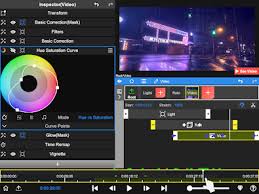
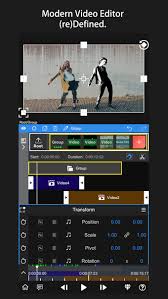
The app’s interface, while complex at first glance, is intuitive once users familiarize themselves with its layout. It includes a preview window, contextual menus, and a timeline for precise editing. Node Video supports advanced techniques like keyframe animation, motion tracking, and color correction, making it a favorite among mobile editors who demand professional results. Its ability to handle complex projects with ease sets it apart from competitors like CapCut or VN Video Editor.
Key Features of Node Video
1. Limitless Layers and Groups
One of Node Video’s standout features is its support for unlimited layers and groups. This allows editors to work on intricate projects with multiple video, audio, and effect layers without restrictions. Whether you’re adding text overlays, visual effects, or background music, Node Video provides the flexibility to organize and manipulate each element independently.
2. AI-Powered Editing
Node Video leverages artificial intelligence to streamline complex editing tasks. For instance, its AI-powered human matting feature can separate a person from the background in real time with just one tap. This is particularly useful for creating professional-looking videos with custom backgrounds or effects. The app also uses AI to enhance motion tracking, allowing users to follow objects or animate specific elements seamlessly.
3. Revolutionary Audio Reactor
The Audio Reactor in Node Video is a game-changer for editors who want to sync visual effects with sound. This feature lets users visualize audio and control effect parameters based on the audio spectrum. For example, you can make effects like glow or motion blur pulse in time with the beat of the music, creating dynamic and engaging visuals.
4. 3D Rendering and Effects
Node Video supports 3D rendering, enabling users to map videos and images onto 3D models. This feature, typically reserved for desktop software, adds a new dimension to mobile editing. The app also offers a wide range of professional effects, including lens flare, motion blur, and color grading tools like RGB and HSL curves. Pro subscribers gain access to exclusive presets and effects, updated regularly to keep content fresh.
5. Fast Rendering and Export
Despite its advanced features, Node Video is optimized for mobile devices, offering super-fast rendering speeds. Users can export videos in various resolutions, including 4K, with customizable parameters like aspect ratio and quality. The export time depends on the video’s complexity and device performance, but Node Video ensures high-quality output without excessive wait times.
Why Choose Node Video?
Node Video is not the simplest editing app, and its learning curve may intimidate beginners. However, for those willing to invest time in mastering its tools, the app delivers unparalleled creative control. Its professional-grade features make it ideal for content creators, social media influencers, and even filmmakers working on mobile projects. Unlike many free apps that rely heavily on in-app purchases or ads, Node Video offers 90% of its features for free, with no ads or watermarks, making it a cost-effective choice.
The app’s ability to handle complex edits, such as masking, keyframe animation, and 3D rendering, makes it a viable alternative to desktop software. For creators who need to edit on the go, Node Video provides a powerful solution without sacrificing quality. Its integration of AI technology further simplifies tasks that would otherwise require hours of manual work, such as background removal or precise motion tracking.
How to Download Node Video APK
For Android users, Node Video is available on the Google Play Store, but some prefer to download the Node Video APK for direct installation. The Node Video APK allows users to access the app without relying on app stores, which can be useful in regions where the Play Store is restricted or for installing specific versions of the app.
Steps to Download and Install Node Video APK
- Find a Trusted Source: To download the Node Video APK, visit reputable websites like APKMirror, APKPure, or Uptodown. These platforms ensure the APK files are safe and virus-free.
- Enable Unknown Sources: On your Android device, go to Settings > Security (or Privacy) and enable the option to install apps from unknown sources.
- Download the APK: Navigate to the download page on a trusted site and click the download button for the latest version of the Node Video APK. For example, version 7.2.2 was available as of April 2025.
- Install the APK: Once downloaded, locate the file in your device’s Downloads folder and tap to install. Follow the on-screen prompts to complete the installation.
- Open Node Video: Launch the app and grant any necessary permissions, such as access to storage or media, to start editing.
Safety Considerations
When downloading the Node Video APK, always use trusted sources to avoid malware or modified files. Sites like Softonic and APKMirror manually review APKs to ensure they are safe. Additionally, be cautious with modded APKs, as they may unlock premium features but could pose security risks or violate the app’s terms of use.
Challenges and Limitations
While Node Video is powerful, it’s not without its challenges. Some users find the interface complex, especially compared to simpler apps like CapCut. Tasks like splitting clips or syncing audio to beats can be difficult without tutorials, which are scarce for Node Video. Additionally, exporting high-quality videos with complex effects can take longer on lower-end devices, with some users reporting export times of up to 12 hours for intricate projects.
The Pro subscription, which unlocks features like advanced 3D rendering and exclusive effects, may be a barrier for some users. While the free version is robust, certain AI-powered tools and presets are reserved for paying subscribers.
Tips for Using Node Video
- Start with Basic Edits: If you’re new to Node Video, begin with simple tasks like cropping or adding transitions before diving into advanced features like keyframe animation.
- Explore AI Tools: Use the AI matting feature to quickly remove backgrounds or isolate subjects, saving time on manual edits.
- Leverage the Audio Reactor: Experiment with the Audio Reactor to create music-driven effects, perfect for TikTok or Instagram Reels.
- Check for Updates: Node Video is updated regularly with new effects and bug fixes. Ensure you have the latest version for optimal performance.
- Join Online Communities: Look for Node Video tutorials on platforms like YouTube or forums to learn advanced techniques, as official documentation is limited.
Conclusion
Node Video is a powerhouse in the world of mobile video editing, offering professional-grade tools in a compact, user-friendly package. From its limitless layers and AI-powered features to its fast rendering and 3D capabilities, Node Video empowers creators to produce stunning videos without a computer. By downloading the Node Video APK from trusted sources, Android users can access this versatile app even in regions where app stores are limited. While it may have a steeper learning curve than other mobile editors, the creative possibilities it unlocks make it worth the effort. Whether you’re a seasoned editor or a beginner looking to elevate your content, Node Video is a must-have tool for creating professional-quality videos on the go.