
HryFine app
In the rapidly evolving world of wearable technology, the HryFine smartwatch has emerged as an affordable and feature-packed option for users seeking to integrate health tracking, notifications, and smart functionalities into their daily lives. Paired with the HryFine app and supported by the HryFine manual, this ecosystem offers a unified experience for managing fitness goals, staying connected, and personalizing your device. This article delves into the features, setup process, user feedback, and limitations of the HryFine watch, providing a detailed overview for both new and prospective users.
The HryFine brand, developed by Shenzhen United Power Technology Co., Ltd., is designed to provide an accessible entry point into the world of smart wearables. The HryFine watch is a budget-friendly smartwatch that syncs with the HryFine app to deliver a range of functionalities, from fitness tracking to call and message notifications. The HryFine manual serves as a guide to help users set up and maximize the potential of their device. Together, these components create a cohesive system aimed at enhancing the user’s “sports life” while maintaining affordability.
The HryFine app is the central hub for managing the HryFine watch. Available for both iOS and Android, it integrates data from the wearable device, offering insights into steps, calories burned, sleep patterns, and more. The app also supports notifications for calls, SMS, and third-party apps like WeChat, WhatsApp, and Facebook, making it a versatile tool for staying connected. The HryFine manual provides step-by-step instructions for setup, troubleshooting, and feature utilization, ensuring users can navigate the system with ease.
Key Features of the HryFine Watch
The HryFine watch is packed with features that cater to fitness enthusiasts and casual users alike. Here are some of its standout capabilities:
- Fitness Tracking: The watch records steps, distance, calories burned, and supports multiple exercise modes such as running, cycling, and walking. While not medical-grade, it offers heart rate monitoring, blood pressure tracking, and sleep analysis, though users should note that these measurements are for reference only.
- Notifications: The HryFine watch pushes call, SMS, and third-party app notifications to your wrist via Bluetooth Low Energy (BLE), ensuring you never miss an important update.
- Remote Features: Users can control their phone’s camera for hands-free photography or manage music playback directly from the watch.
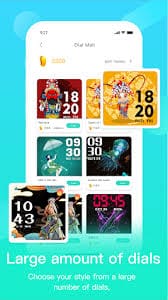
- Customization: The watch offers a variety of watch faces, from minimalist designs to intricate artwork, allowing users to personalize their device. However, some users have noted limitations in creating fully custom watch faces.
- Device Management: Features like Bluetooth anti-lost alerts and battery monitoring help users keep track of their device’s status.
The HryFine manual outlines these features in detail, providing instructions on how to enable and configure them through the HryFine app.
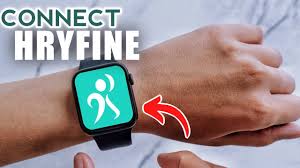
Setting Up the HryFine Watch with the HryFine App
Pairing the HryFine watch with the HryFine app is a straightforward process, as detailed in the HryFine manual. Here’s a step-by-step guide based on user feedback and official documentation:
- Download the App: Scan the QR code provided in the HryFine manual or download the HryFine app from the Google Play Store, App Store, or trusted sources like APKPure.
- Enable Bluetooth: Turn on Bluetooth on your smartphone and ensure the HryFine watch is in dual Bluetooth mode (one for general connectivity, another for audio). This is critical for full functionality, as some features like music control require both connections.
- Pair the Device: Open the HryFine app, navigate to the “Add Device” section, and select your HryFine watch from the list of available devices. Ensure the watch is close to the phone during pairing to avoid connectivity issues.
- Grant Permissions: The app will request permissions for location, notifications, and other features. Users must toggle these settings to “on” to enable full functionality.
- Configure Settings: Use the HryFine app to set preferences like notifications, sedentary reminders, and watch face selection. The HryFine manual provides detailed guidance on accessing these settings.
User reviews emphasize the importance of following the HryFine manual closely, as improper setup (e.g., not enabling dual Bluetooth mode) can lead to issues like notifications not syncing or audio playing through the watch instead of the phone.

User Feedback and Common Issues
The HryFine watch and HryFine app have garnered mixed reviews, reflecting both their affordability and limitations. Many users praise the value for money, with some noting that a $2 watch from retailers like Shein or Temu exceeds expectations. Key strengths include the app’s user-friendly interface, real-time data tracking, and notification reliability when properly configured.
However, several common issues have been reported:
- Inaccurate Health Data: The heart rate monitor is often cited as being 15% higher than actual readings, and sleep tracking misses data before midnight. Blood pressure and oxygen measurements are also inconsistent, reinforcing the non-medical nature of the device.
- Bluetooth Connectivity: Some users experience frequent disconnections or difficulties pairing the watch, requiring repeated attempts or manual intervention.
- Step Counting: The step counter often overestimates, with one user reporting 49,000 steps in a day compared to a Fitbit’s 4,000.
- Customization Limitations: While the HryFine watch supports multiple watch faces, users have expressed frustration over the lack of a robust custom watch face designer.
- Battery and Durability: Some models require frequent charging, and certain units have failed to turn on or sync properly after initial use.
The HryFine manual addresses some of these issues, offering troubleshooting tips like ensuring proper Bluetooth settings and checking the watch’s MAC address for pairing. However, users have called for updates to improve vibration strength, font options, and third-party app integration (e.g., Strava or Pacer).
Tips for Maximizing Your HryFine Experience
To get the most out of your HryFine watch and HryFine app, consider these tips based on user feedback and the HryFine manual:
- Read the Manual: The HryFine manual is essential for understanding setup nuances, such as enabling dual Bluetooth mode or configuring notifications.
- Check Permissions: Ensure all necessary permissions are granted in the HryFine app to avoid missing notifications or data sync issues.
- Update Firmware: If available, check for firmware updates in the HryFine app to address bugs or improve performance.
- Manage Audio Settings: If audio plays through the watch instead of the phone, verify the Bluetooth audio connection and disable it if unnecessary.
- Set Realistic Expectations: Given its low price point, the HryFine watch is not a medical device. Use its health data as a general guide rather than a definitive measurement.
Conclusion
Get the HryFine MOD APK and take use of all of its entertainment features to make everything come to you. You can stick to your workout routine with the aid of HryFine, a multipurpose gadget. The seamless connection with your applications allows you to answer calls and respond to messages on your smartphone or wristwatch, which also makes using them more comfortable. The software operates excellently when it functions as intended, despite a few bugs that need to be fixed, such as network problems and frequent crashes.