
Virtual Xposed MOD APK
The Android operating system is celebrated for its flexibility and customization potential, allowing users to tailor their devices to suit their preferences. For advanced users, tools like the Xposed Framework have long been a go-to solution for deep system modifications. However, rooting a device to use Xposed can void warranties and pose security risks. Enter the Virtual Xposed MOD APK, a revolutionary application that brings the power of Xposed modules to non-rooted Android devices by creating virtual environments for app customization. This article delves into the features, benefits, installation process, limitations, and ethical considerations of the Virtual Xposed MOD APK, providing a thorough understanding of this powerful tool.
The Virtual Xposed MOD APK is a modified version of the VirtualXposed application, developed by Weishu, designed to allow users to run Xposed modules without rooting their Android devices, unlocking the bootloader, or modifying the system image. Unlike the traditional Xposed Framework, which requires root access to alter system-level settings, Virtual Xposed MOD APK operates within a virtual environment, creating parallel spaces where apps and modules run as plugins. This approach makes it an attractive option for users who want to customize their devices without compromising warranty or security.
The Virtual Xposed MOD APK leverages open-source libraries like VirtualApp and Epic to execute Xposed hooks, enabling modifications to apps running within its virtual space. The MOD version often includes additional features, such as ad-blocking, enhanced module compatibility, or premium tools unlocked for free, though these additions depend on the specific MOD variant.
Key Features of Virtual Xposed MOD APK
The Virtual Xposed MOD APK offers a range of features that make it a compelling choice for Android enthusiasts:
- No Root Required: The standout feature of Virtual Xposed MOD APK is its ability to run Xposed modules without root access. This preserves the device’s warranty and avoids the risks associated with rooting, such as potential bricking or security vulnerabilities.
- Virtual Spaces for Apps: The app creates isolated virtual environments where users can clone and run APKs as plugins. This allows modifications to specific apps without affecting the main system, ensuring stability.
- Xposed Module Support: Users can install modules like XPrivacyLua, XInsta, YouTube AdAway, and MDWechat to customize app behavior. For example, XInsta enables downloading Instagram videos, while YouTube AdAway removes ads from YouTube.
- Game Modification Capabilities: When paired with tools like Game Guardian, Virtual Xposed MOD APK allows gamers to tweak in-game parameters, such as currency or health points, within the virtual space, reducing the risk of bans.
- Enhanced Compatibility: The Virtual Xposed MOD APK supports both 32-bit and 64-bit architectures, ensuring compatibility across a wide range of Android devices running versions 5.0 to 10.0.
- Ad-Free Experience: Many MOD versions of Virtual Xposed include built-in ad-blocking features, enhancing user experience by removing intrusive advertisements from apps.
- Customizable Interface: Users can modify app appearances, such as changing themes or icons, and even tweak system settings within the virtual environment, offering a personalized Android experience.

How to Install Virtual Xposed MOD APK
Installing the Virtual Xposed MOD APK is straightforward but requires enabling installations from unknown sources, as the app is not available on the Google Play Store. Here’s a step-by-step guide:
- Download the APK: Obtain the latest Virtual Xposed MOD APK from a trusted source, such as virtualxposed.org or apkmodbucket.com. Ensure the version matches your device’s architecture (32-bit or 64-bit).
- Enable Unknown Sources: Go to Settings > Security on your Android device and enable the “Unknown Sources” option to allow installation of third-party APKs.
- Install the APK: Locate the downloaded Virtual Xposed MOD APK file in your file manager, tap it, and follow the on-screen prompts to install.
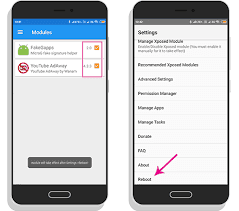
- Add Apps and Modules: Open Virtual Xposed MOD APK, click the Drawer Button or long-press the home screen, and select “Add App.” Choose apps from your device or install APKs via the floating action button. To add Xposed modules, open the built-in Xposed Installer, navigate to the “Download” section, select desired modules, and enable them in the “Modules” section.
- Reboot VirtualXposed: After enabling modules, go to Settings in Virtual Xposed MOD APK and select “Reboot” to activate the changes. No system reboot is required.
Benefits of Using Virtual Xposed MOD APK
The Virtual Xposed MOD APK offers several advantages for Android users seeking customization without rooting:
- Safety and Stability: By operating in a virtual environment, Virtual Xposed MOD APK isolates modifications, preventing unintended changes to the main system. This reduces the risk of crashes or data loss.
- Warranty Preservation: Since no root or bootloader unlocking is needed, users can customize their devices without voiding manufacturer warranties.
- Ease of Use: The app’s interface is user-friendly, resembling a simple launcher, making it accessible even for those with limited technical expertise.
- Versatility: From ad-blocking to GPS spoofing and game tweaks, Virtual Xposed MOD APK supports a wide range of customization options through compatible modules.
Limitations of Virtual Xposed MOD APK
Despite its advantages, Virtual Xposed MOD APK has some limitations:
- No System Modifications: Due to its non-rooted nature, Virtual Xposed APK cannot modify system-level settings. Modules like GravityBox, which require system access, are incompatible.
- Limited Module Support: Not all Xposed modules work with Virtual Xposed APK. Theming modules and those requiring resource hooks are unsupported.
- Performance Overhead: Running apps in a virtual environment may consume more resources, potentially impacting device performance on lower-end hardware.
- Security Risks with MODs: While the official VirtualXposed is considered safe, MOD APKs from unverified sources may contain malware or unwanted permissions. Always download from reputable sites.
- Compatibility Issues: The app does not support Google Play Services natively, though workarounds like MicroG exist. It also lacks support for certain architectures (e.g., arm32, x86_64) for ART.

Ethical and Legal Considerations
Using the Virtual Xposed MOD APK raises ethical and legal questions, particularly with MOD versions that unlock premium features or bypass restrictions. Modifying apps to remove ads or access paid features may violate app developers’ terms of service, potentially leading to account bans or legal action. Additionally, downloading APKs from untrusted sources can expose devices to malware, compromising personal data. Users should exercise caution, verify sources, and consider the ethical implications of modifying apps without supporting their developers.
Why Choose Virtual Xposed MOD APK?
The Virtual Xposed MOD APK is ideal for users who want to explore Android customization without the risks of rooting. It offers a safe, flexible platform for running Xposed modules, cloning apps, and tweaking settings within a virtual environment. Whether you’re a gamer looking to enhance gameplay or an enthusiast aiming to personalize your device, Virtual Xposed MOD APK provides a powerful, root-free solution.
Conclusion
The Virtual Xposed MOD APK is a game-changer for Android customization, bringing the power of Xposed modules to non-rooted devices. By creating virtual spaces, it enables users to modify apps, block ads, and enhance functionality without compromising device integrity. While it has limitations, such as the inability to modify system settings, its ease of use, safety, and versatility make it a valuable tool for Android enthusiasts. However, users must approach MOD APKs with caution, prioritizing trusted sources and respecting app developers’ rights. With Virtual Xposed MOD APK, you can unlock a new level of customization, transforming your Android experience without rooting.